Asset Types
Below are the most common asset types.
| Asset Type | Description |
|---|---|
| stacks | stacks in stacks/_ed_configs/<stack_name> |
| execgroups | execution groups in folder execgroups/_ed_configs/<group_name> |
| files | files in execgroups/_ed_configs/<group_name>/_chrootfiles/<path_to_file> |
| actions | action files in execgroups/_ed_configs/<group_name>/_actions/<seq_num>-<action_name> |
| env_vars | standard1 environmental variables in env_vars/_ed_configs/<env_var_name> |
| shellouts | scripts2 in shellouts/_ed_configs/<shellout_name> |
Stacks
Stacks serve as the highest level of abstraction in the system, acting as the technology glue that integrates different components and assets. These assets primarily consist of execution/host groups containing OpenTofu code, as well as other stacks referred to as substacks. Stacks function as small workflows that assemble and organize OpenTofu code and other stacks, providing a structured and modular approach to managing OpenTofu-based code. They enable efficient and scalable management of OpenTofu.
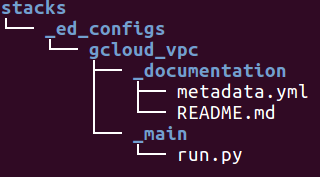
Stacks are composed of the following components:
-
_main/run.py
The_main/run.pyserves as the entry point for managing OpenTofu.
It contains notable references to OpenTofu code, other substacks, and automation logic. -
_documentation/metadata.yml
The metadata.yml file provides a concise description, release version, and tags for the stack.
Example:
desc: The stack is essentially stops an ec2 server. release: 0.0.1 categories: - ec2 - aws tags: - config0 - helper - ec2 - aws -
_documentation/README.md
The README.md file provides a standardized format for readers to understand how to use the stack.
It includes examples and instructions on how to utilize the stack effectively.
Example:
**Description**

  - The stack essentially stops an ec2 server

**Required**

  | argument  | description             | var type | default  |
  | --------- | ----------------------- | -------- | -------- |
  | hostname  | hostname to be stopped  | string   | None     |
Execgroups
Execution and hostgroups are assets that can be executed in either the orchestration or delegation (VM/server) layer, respectively.
They serve as a grouping of files to be executed:
Files
- Files are located in the relative root folder
_chrootfiles. - These files are copied to the destination machine during the execution.
- The file location is relative to the
_chrootfiles.
For example,_chrootfiles/root/hello.txtwill place the filehello.txtin therootfolder on the destination machine.
Env_vars
Env_vars refers to environmental variables that are used to determine the behavior of a shellout. These variables are typically specified within the action of an execution group.
Example: aws_default
- env var reference - elasticdev:::aws::aws_default
(environmental variables for AWS automation)
Shellouts
Shellouts are script-based that can be written in various languages, with Python and Go being commonly used. They are specified within the action of an execution group.
For instance, there could be a shellout named ec2-server with the reference elasticdev:::aws::ec2-server. This script performs actions related to EC2 instances, such as creating, destroying, stopping, or managing them.
Example: ec2-server
- shellout reference - elasticdev:::aws::ec2-server
(python script that creates, destroys, stop and sleep ec2 instances)
Actions
- Actions are located in the
_actionsfolder. - They are sequentialized executions ordered by “prefix number”.
- Action configurations are similar to “run scripts” in the Unix startup process.
- These scripts are executed in the order specified by the prefix numbers, such as 10, 20, 30, and so on.
- Examples:
10-install-systat20-install-mysql30-configure-mysql
- Action assets can include environmental variables (env_var) and shell scripts (shellout).
- Examples:
Environmental variable asset:elasticdev:::aws::aws_default
Shell script asset:execgroups/_ed_configs/vpc/_actions/30-exec_terraform.py
def default():

    return {
        'method': 'shelloutconfig',
        'metadata': {
            'env_vars': ['elasticdev:::aws::aws_default'],
            'shelloutconfigs': ['elasticdev:::terraform::resource_wrapper']
        }
    }